Point-of-sale (POS) systems have changed considerably as businesses adopt digital payments, cloud-based software, mobile devices, and integrated sales management platforms. Retail stores, restaurants, supermarkets, and service providers increasingly need equipment that can work with different transaction processes while maintaining reliable daily operations. Receipt printers remain an important part of these systems because they provide customers with physical transaction records and support internal business procedures.
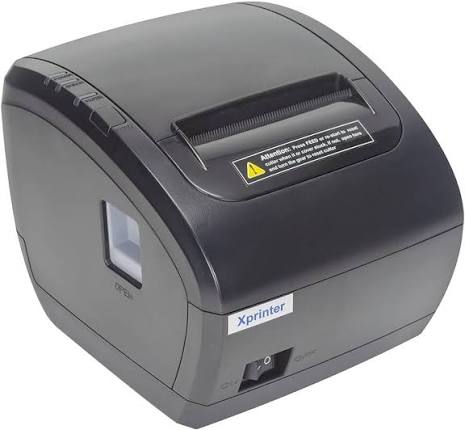
As POS technology develops, businesses must evaluate whether their printing equipment can meet new connectivity, compatibility, and workflow requirements. An Xprinter Receipt Printer may be considered when organizations review their receipt printing options. Understanding the features that support modern POS environments helps businesses determine whether a particular model fits their current systems and future plans.
The Changing Requirements of Modern POS Systems
Traditional POS systems often relied on desktop computers, cash registers, and directly connected receipt printers. Modern setups may include touchscreen terminals, tablets, mobile payment devices, cloud-based applications, and network-connected hardware.
These developments have changed how businesses manage transactions. A receipt printer may now need to communicate with several types of devices or operate as part of a broader network rather than serving a single checkout computer.
Businesses also expect transaction equipment to support efficient workflows during busy periods. Printing speed, connection stability, software compatibility, and ease of maintenance have therefore become important considerations when selecting receipt printing equipment.
Supporting Different Connectivity Requirements
Connectivity is one of the main factors influencing how receipt printers fit into changing POS environments. Businesses use different hardware configurations depending on their size, layout, and software requirements.
USB Connections for Direct POS Integration
USB connectivity remains common in traditional checkout environments. It allows a receipt printer to connect directly to a compatible computer or POS terminal.
This arrangement is suitable for many small retail stores, individual checkout stations, and service counters. Installation is generally straightforward when the required drivers and operating system support are available.
Ethernet for Network-Based Printing
Larger businesses may operate multiple POS terminals across a store or restaurant. Ethernet connectivity can allow compatible printers to communicate through a local network.
This arrangement may provide greater flexibility when equipment needs to be installed away from individual computers. However, network configuration, printer addressing, and software support must be checked before implementation.
Wireless Connectivity for Flexible Workspaces
Bluetooth and Wi-Fi can support wireless printing in compatible POS environments. These options may be useful for mobile checkout stations, compact service counters, or businesses that want to reduce cable connections.
Wireless support varies by model, so businesses should confirm the exact connection options and device compatibility before purchasing equipment.
Adapting to Cloud-Based POS Platforms
Cloud-based POS systems allow businesses to manage sales information and operational data through internet-connected applications. They can support centralized reporting, inventory management, and access to transaction information across multiple locations.
Receipt printers may be incorporated into these environments through compatible terminals, applications, network configurations, or supported printing services. However, a printer does not automatically support every cloud-based POS platform simply because it has network connectivity.
Businesses should verify whether the printer works with their chosen software and whether additional drivers, applications, or configuration steps are required. Testing the complete setup before deployment can help identify compatibility limitations.
Supporting Mobile and Tablet-Based Transactions
Mobile POS systems are increasingly used in restaurants, pop-up stores, outdoor sales environments, and businesses that need flexible checkout arrangements. Tablets and smartphones can allow employees to process payments without relying on a fixed counter.
Compatible receipt printers can support these workflows by connecting to mobile devices through supported wireless interfaces or other suitable configurations. This can help employees provide printed transaction records while serving customers in different areas.
When evaluating a printer for mobile use, businesses should consider:
- Supported Bluetooth or Wi-Fi standards, where applicable.
- Compatibility with the mobile operating system.
- Availability of suitable printing applications or drivers.
- Battery and power requirements for the complete setup.
- Printing distance and network conditions.
- Paper replacement and equipment portability.
These details help determine whether a printer can support the intended mobile workflow.
Maintaining Performance as Transaction Volumes Change
Business transaction volumes can fluctuate according to seasonal demand, promotions, customer traffic, and operating hours. A printer selected for a small workload may not be suitable if the business expands or begins processing significantly more transactions.
Printing speed is one relevant specification, but it should be considered alongside other performance factors. Businesses should evaluate the printer’s supported duty cycle, operating conditions, paper capacity, and expected usage.
For high-traffic environments, consistent output and dependable paper feeding are especially important. A printer that works reliably during peak periods can help employees maintain checkout efficiency and avoid unnecessary interruptions.
Improving Integration with Business Equipment
Modern POS environments often include several connected devices, such as barcode scanners, cash drawers, customer displays, payment terminals, and inventory systems. Receipt printers must fit into this equipment arrangement without creating unnecessary technical complexity.
Some receipt printers support cash drawer connections or specific control commands that allow the POS system to trigger drawer operations after a transaction. Businesses should verify the availability and configuration of such features for the exact model.
Software compatibility is equally important. Printer drivers, supported command languages, and POS application requirements determine how transaction data is converted into printed receipts.
Before introducing new equipment, businesses should confirm that all connected devices can operate together as intended.
Supporting Different Receipt Formats and Business Needs
POS requirements vary across industries. A grocery store may print receipts containing many product lines, while a café may need compact bills with order details and payment information. A service provider may use a different layout containing customer references or service descriptions.
Receipt printers should therefore be evaluated according to their supported paper width, print resolution, character handling, and formatting capabilities.
Businesses should also consider whether their POS software can generate the required receipt layouts. A printer’s hardware specifications alone do not determine which information can be displayed; the software and supported printing commands also influence the final format.
Maintenance and Software Updates in Modern POS Environments
As businesses update their POS systems, they may also need to review printer drivers, firmware, and configuration settings. Keeping these components compatible can help reduce communication problems between the printer and connected devices.
Routine maintenance remains important regardless of the POS platform. Employees should clean the print head according to manufacturer instructions, remove paper residue, inspect cables, and use compatible thermal paper where required.
Businesses should also maintain access to installation instructions and model-specific technical documentation. This information can make it easier to configure replacement devices and resolve common printing issues.
Preparing Receipt Printing Systems for Business Growth
A business may begin with one checkout terminal and later expand to several locations or service stations. Selecting printing equipment with suitable connectivity and software support can make future expansion easier.
Before purchasing, organizations should consider their expected growth, the number of printers they may need, and whether their POS platform will change. Standardizing compatible equipment across locations can simplify training, maintenance, and supply purchasing.
It is also useful to assess the availability of technical support and replacement components. These factors can influence how easily a business manages its printing infrastructure over time.
Key Factors to Review When Choosing a Model
Businesses can use the following checklist when comparing receipt printers for modern POS environments:
| Requirement | What to evaluate |
|---|---|
| POS compatibility | Supported operating systems, drivers, and software |
| Connectivity | USB, Ethernet, Bluetooth, or Wi-Fi availability |
| Printing performance | Speed, resolution, and expected workload |
| Paper support | Compatible width, roll diameter, and paper type |
| Mobile integration | Support for required phones or tablets |
| Installation | Space requirements, power, and network configuration |
| Maintenance | Cleaning procedures and replacement supplies |
| Future expansion | Suitability for additional terminals or locations |
Checking these factors against actual business requirements can help prevent unnecessary purchases and reduce integration problems.
Conclusion
Changing POS requirements have made connectivity, software compatibility, flexible installation, and reliable performance increasingly important in receipt printing. Businesses now need to consider how printers will work with traditional terminals, cloud-based platforms, mobile devices, and integrated checkout equipment.
Xprinter receipt printers can be evaluated according to these requirements, but capabilities differ between individual models. By checking exact specifications, testing software compatibility, and considering future transaction needs, businesses can select printing equipment that supports their current POS environment while providing a practical foundation for operational changes.