Managing a business efficiently requires more than simply processing customer payments. Modern businesses need tools that can track inventory, monitor sales, manage employees, and provide valuable insights into daily operations. This is where a point-of-sale (POS) system becomes an essential part of business management. Whether you’re running a retail store, restaurant, supermarket, or service-based business, understanding how a POS system works can help you improve productivity and customer satisfaction.
For businesses looking to streamline operations, a Full POS System offers a comprehensive solution that combines payment processing with inventory management, reporting, customer management, and employee tracking. Instead of relying on multiple disconnected tools, businesses can manage essential operations from one centralized platform.
What Is a Full POS System?
A full POS system is an integrated combination of hardware and software designed to handle sales transactions while supporting a wide range of business functions. Unlike a basic cash register, it provides tools for managing inventory, monitoring employee performance, generating reports, and maintaining customer records.
The goal of a full POS system is to improve efficiency, reduce manual work, and provide accurate business data for better decision-making.
Main Components of a Full POS System
A complete setup typically includes both hardware and software components that work together seamlessly.
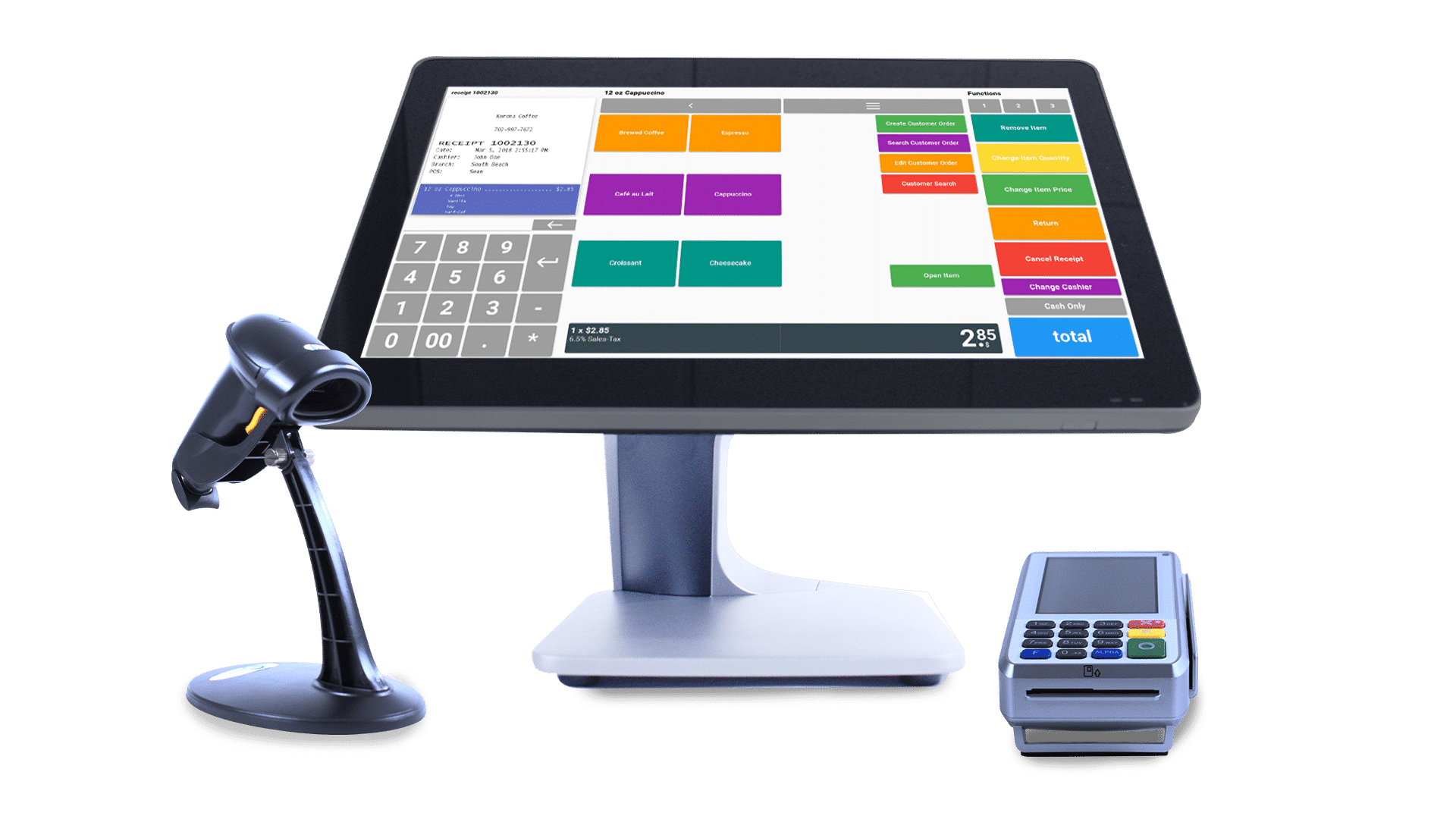
Common hardware includes:
- Touchscreen terminal or computer
- Barcode scanner
- Receipt printer
- Cash drawer
- Card payment terminal
- Customer-facing display
The software manages transactions, inventory, reporting, customer information, and employee access within a single interface.
How Does a Full POS System Work?
The system follows a straightforward process whenever a customer makes a purchase.
- Products are scanned or selected.
- The software calculates the total amount, taxes, and discounts.
- The customer completes payment using their preferred method.
- A receipt is printed or sent electronically.
- Inventory levels are automatically updated.
- Sales data is stored for reporting and future analysis.
This automated workflow minimizes errors and improves operational efficiency.
Key Features
Modern full POS systems offer a wide range of features that support daily business operations.
Inventory Management
The system automatically updates inventory after each sale, helping businesses maintain accurate stock levels and receive alerts when products need replenishment.
Sales Reporting
Detailed reports provide valuable insights into sales performance, product trends, and revenue, helping business owners make informed decisions.
Customer Management
Customer profiles and purchase histories make it easier to provide personalized service, manage loyalty programs, and create targeted promotions.
Employee Management
Managers can track employee working hours, sales performance, and transaction history, improving accountability and operational oversight.
Multiple Payment Methods
Most modern systems support cash, credit cards, debit cards, contactless payments, and mobile wallets, giving customers greater flexibility during checkout.
Benefits of a Full POS System
A full POS system offers several advantages that extend beyond simple payment processing.
Some of the key benefits include:
- Faster checkout experiences.
- Improved inventory accuracy.
- Better sales reporting.
- Reduced manual errors.
- Enhanced customer service.
- Easier employee management.
- More informed business decisions through real-time data.
These benefits help businesses improve efficiency while delivering a better customer experience.
Industries That Use Full POS Systems
Full POS systems are widely used across many industries because they can be customized to meet different operational needs.
Common industries include:
- Retail stores
- Restaurants
- Grocery stores
- Pharmacies
- Hotels
- Cafés
- Electronics retailers
- Service businesses
Each business can configure the system according to its specific workflow and requirements.
Choosing the Right Full POS System
When evaluating different options, businesses should consider factors such as ease of use, scalability, reporting capabilities, integration with other software, payment compatibility, and customer support.
Selecting a flexible solution ensures the system can continue supporting the business as it grows and adapts to changing market demands.
Conclusion
A full POS system is much more than a payment-processing solution. It serves as a centralized platform that helps businesses manage sales, inventory, customers, employees, and reporting from one location. By automating routine tasks and providing real-time business insights, it improves operational efficiency and supports smarter decision-making. For businesses seeking to simplify operations and prepare for future growth, investing in a reliable full POS system is a practical and valuable choice.