Thermal printers play an important role in businesses that depend on fast and consistent document printing. Retail stores, restaurants, logistics companies, healthcare facilities, and service providers use these devices to produce receipts, labels, tickets, and other essential records. Since printing equipment often operates throughout the working day, durability and reliability are important factors when evaluating a suitable model.
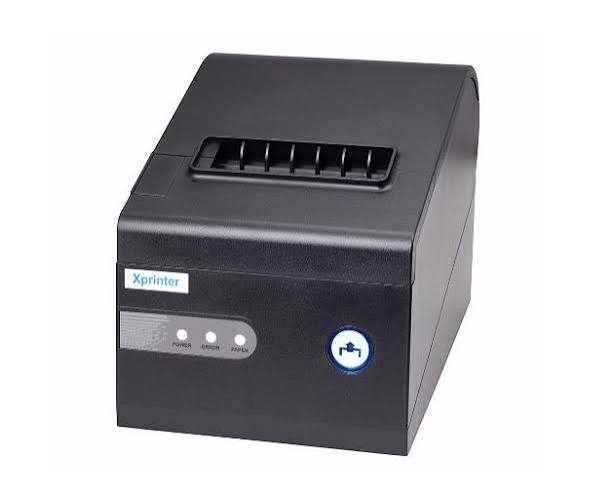
Understanding the construction, operating capabilities, and maintenance requirements of an Xprinter Thermal Printer can help businesses make informed purchasing decisions. A printer that performs consistently under regular workloads can reduce interruptions, support employee productivity, and contribute to smoother daily operations.
Why Durability Matters in Thermal Printing
Durability refers to a printer’s ability to withstand regular use while maintaining acceptable performance. In commercial environments, printing equipment may handle hundreds or thousands of transactions, depending on the business and its workload.
A durable printer can help businesses avoid frequent equipment replacements and unnecessary maintenance expenses. It is particularly valuable in busy checkout areas, where printer problems can delay transactions and affect customer service.
Several factors influence printer durability, including:
- The quality of internal mechanical components
- Printhead construction and expected service life
- Cutter design and operating capacity
- Resistance to normal workplace conditions
- Proper installation and routine maintenance
Evaluating these factors provides a better understanding of whether a printer is suitable for a particular working environment.
Understanding the Components That Affect Reliability
A thermal printer contains several components that work together to produce printed output. The condition and quality of these parts influence overall performance.
Thermal Printhead
The printhead is responsible for applying heat to thermal paper to create text, symbols, and graphics. It is one of the most important components because its condition directly affects print clarity.
Dust, paper residue, unsuitable paper, and excessive heat can contribute to printhead wear. Regular cleaning and the use of compatible thermal paper help maintain consistent output.
Paper Feeding Mechanism
The feeding mechanism moves paper through the printer at a controlled speed. Reliable paper movement helps prevent uneven printing, paper jams, and interrupted transactions.
A well-maintained feeding system is particularly important in businesses that print receipts continuously throughout the day.
Automatic Cutter
Some thermal receipt printers include an automatic cutter that separates printed receipts. This feature can improve convenience and reduce manual handling at busy checkout counters.
Because the cutter contains moving parts, its expected service life and maintenance requirements should be considered when selecting equipment.
Internal Electronic Components
Control boards, sensors, and connectivity interfaces coordinate the printer’s operations. Stable electronic components help ensure that print commands are received and processed correctly.
Businesses should also check whether the printer offers suitable protection against common operating issues, such as incorrect paper loading or communication interruptions.
Factors That Influence Long-Term Performance
A printer’s reliability depends on more than its initial construction. The conditions in which it operates and the way employees use it can significantly influence its working life.
Important considerations include:
Printing workload: A printer used continuously needs to be appropriate for the expected daily print volume. Operating beyond its recommended capacity may increase wear.
Paper quality: Poor-quality or incompatible thermal paper can produce inconsistent results and leave additional residue on the printhead.
Operating environment: Excessive dust, moisture, heat, and direct sunlight can affect printer performance and the condition of printed receipts.
Power stability: Unstable power supplies or unsuitable adapters may cause operational problems or damage electronic components.
Handling practices: Rough paper loading, forced removal of jammed paper, and careless handling can shorten the service life of mechanical parts.
Taking these factors into account helps businesses create a more dependable printing environment.
How Consistent Printing Supports Business Operations
Reliability is especially important when printing is connected to everyday business activities. A printer that produces clear and consistent output helps employees complete transactions without unnecessary delays.
In retail stores, dependable receipt printing supports checkout operations and provides customers with transaction records. In restaurants, printers may produce kitchen orders, payment receipts, and customer bills. Logistics businesses may rely on thermal printing for shipping labels and tracking information.
In each application, interruptions can affect productivity. Reliable equipment helps reduce the likelihood of printing-related delays and supports more organized workflows.
Evaluating Performance Under Different Workloads
Not every business has the same printing requirements. A small shop may use its printer intermittently, while a supermarket or restaurant may operate multiple printers throughout the day.
Before choosing a model, businesses should evaluate its suitability for the expected workload. Relevant specifications may include print speed, printhead life, cutter life, recommended duty cycle, and supported paper sizes.
It is also useful to consider whether the printer can handle peak operating periods. A device that performs well during occasional printing may not necessarily be the best option for a high-volume checkout environment.
Reviewing manufacturer specifications and testing the equipment under realistic conditions can help establish whether it meets operational expectations.
The Importance of Connectivity Stability
A thermal printer must communicate properly with the POS terminal, computer, tablet, or other connected equipment. Even a mechanically durable printer can cause workflow disruptions if its connection is unreliable.
Common connectivity options include USB, Ethernet, Bluetooth, Wi-Fi, and serial interfaces. The availability of these options varies by model.
Businesses should confirm that the selected printer supports their existing hardware, operating system, and POS software. They should also check driver availability and any relevant integration documentation.
A suitable connection helps prevent communication errors and makes the printer easier to incorporate into the existing business setup.
Maintenance Practices That Extend Printer Life
Regular maintenance is essential for preserving thermal printer performance. Even well-designed equipment can experience reduced print quality or mechanical problems when cleaning and upkeep are neglected.
The following practices can help maintain dependable operation:
- Clean the printhead: Follow the manufacturer’s recommended cleaning procedure to remove dust and residue.
- Inspect the paper compartment: Remove accumulated paper particles and check for obstructions.
- Use compatible paper: Select thermal paper that meets the printer’s specifications.
- Check the cutter: Remove loose paper fragments and follow the recommended maintenance instructions.
- Inspect connections: Periodically check power cables and data connections for damage or looseness.
- Update software: Install compatible drivers and firmware updates when recommended by the manufacturer.
- Train employees: Make sure staff understand correct paper loading and basic troubleshooting procedures.
These steps can reduce avoidable problems and help maintain consistent printing quality.
Common Problems That Can Affect Reliability
Understanding common printer issues makes it easier to identify problems before they cause extended downtime.
Faded or Uneven Printing
Light printing may result from a dirty printhead, unsuitable paper, or incorrect print settings. Cleaning the printhead and checking the paper specifications are useful first steps.
Frequent Paper Jams
Paper jams can occur when rolls are loaded incorrectly, paper is damaged, or debris obstructs the feeding mechanism. Employees should follow the correct loading procedure and avoid forcing paper through the printer.
Connection Interruptions
Communication problems may be caused by loose cables, incorrect network settings, outdated drivers, or incompatible software. Checking the connection configuration can help identify the source.
Cutter Malfunctions
An automatic cutter may stop working correctly because of paper fragments, mechanical wear, or other obstructions. Businesses should follow the manufacturer’s troubleshooting guidance rather than attempting repairs that could damage the mechanism.
Prompt attention to these issues helps prevent minor problems from affecting daily operations.
Choosing a Printer for Different Business Environments
The best thermal printer depends on where and how it will be used. A suitable model for a small retail counter may not meet the demands of a busy restaurant or warehouse.
- Retail stores: Prioritize fast receipt printing, compatible POS connectivity, and convenient paper replacement.
- Restaurants: Consider models suited to frequent order printing and the communication requirements of the kitchen or service counter.
- Warehouses: Evaluate label-printing capabilities, supported media, and compatibility with inventory systems.
- Healthcare facilities: Consider dependable output, clear text, and integration with the facility’s existing systems.
- Small businesses: Focus on practical features, manageable operating costs, and straightforward installation.
Matching the printer to the working environment helps avoid unnecessary equipment limitations.
What to Check Before Purchasing
A careful evaluation can help businesses select equipment that offers suitable long-term value. Rather than relying on a single specification, compare several aspects of the product.
Consider the following checklist:
- Manufacturer’s stated printhead and cutter life
- Recommended printing workload
- Print speed and resolution
- Supported paper types and dimensions
- Available connectivity interfaces
- Operating system and POS software compatibility
- Warranty coverage and technical support
- Availability of replacement parts and consumables
Businesses purchasing multiple units should also consider whether the models can be configured and maintained consistently across different locations.
Conclusion
The durability and reliability of thermal printers depend on component quality, operating conditions, workload, connectivity, and maintenance. Businesses that evaluate these factors carefully are better positioned to choose equipment that supports consistent printing and minimizes avoidable interruptions.
Regular cleaning, compatible paper, correct installation, and appropriate workload management can also contribute to longer service life. By combining careful product selection with responsible maintenance, businesses can build a more dependable printing setup for their everyday operations.