Choosing the right printing equipment is an important decision for businesses that handle regular customer transactions. Retail stores, restaurants, supermarkets, pharmacies, and service centers need reliable devices to generate receipts quickly and maintain accurate transaction records. However, different printers offer varying technical specifications, connectivity options, and performance capabilities.
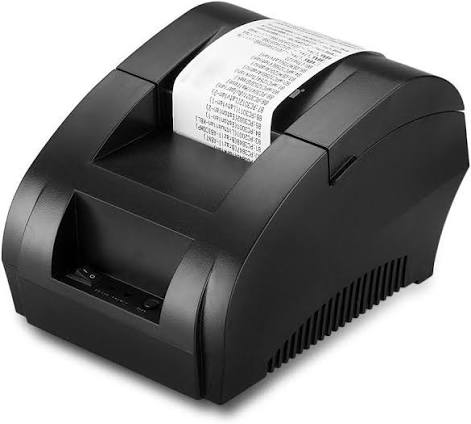
A Thermal Receipt Printer is a popular choice for businesses because it uses heat-sensitive paper to produce printed information without traditional ink or toner. These printers are designed to support fast transaction processing while keeping routine maintenance relatively simple. Before purchasing one, businesses should understand the essential features that influence printing quality, operating efficiency, and long-term reliability.
1. Printing Speed and Performance
Printing speed is one of the first specifications to evaluate when selecting a receipt printer. It determines how quickly the device can generate transaction records after receiving instructions from a POS system.
Printing speed is generally measured in millimeters per second (mm/s). Businesses with high customer traffic should consider models with faster output capabilities to minimize checkout delays.
Small retail shops may operate efficiently with moderate printing speeds, while supermarkets and busy restaurants may require equipment designed for frequent transactions.
2. Print Resolution and Clarity
Print resolution affects the sharpness and readability of printed content. It is particularly important when receipts contain small text, business logos, barcodes, or QR codes.
Many standard thermal receipt printers offer a resolution of 203 DPI, which is generally suitable for everyday transaction printing.
When comparing models, consider whether they can produce clear text and readable codes consistently. This is especially important for businesses that use printed barcodes for inventory tracking or QR codes for digital payment systems.
3. Paper Width Compatibility
Thermal receipt printers are available in different paper-width configurations. The most common options are 58 mm and 80 mm.
58 mm Thermal Printers
These models are suitable for compact receipts containing basic transaction details. Their smaller paper format makes them useful for small shops, kiosks, and businesses with limited counter space.
80 mm Thermal Printers
These printers provide more space for detailed receipts, including product descriptions, tax information, promotional messages, and payment summaries.
The appropriate paper width depends on the business’s receipt format and the amount of information it needs to display.
4. Connectivity Options
Connectivity determines how a printer communicates with POS terminals, computers, tablets, and other devices. Selecting the right interface helps ensure smooth integration with existing business systems.
Common connectivity options include:
- USB: Provides a straightforward connection to computers and compatible POS terminals.
- Ethernet: Allows printers to connect to business networks and shared checkout systems.
- Bluetooth: Supports wireless communication with compatible mobile devices.
- Wi-Fi: Offers wireless network connectivity for suitable business environments.
Before purchasing, check which interfaces are supported and whether they match your existing equipment.
5. POS Software and Operating System Compatibility
A receipt printer must work with the software used to process transactions. Compatibility problems can interrupt checkout operations and create unnecessary installation challenges.
Check whether the printer supports your POS application, operating system, drivers, and communication protocols. Businesses using specialized retail software should verify compatibility before making a final purchasing decision.
It is also useful to confirm whether the manufacturer provides installation instructions and technical documentation.
6. Automatic Paper Cutter
An automatic cutter separates printed receipts from the remaining paper roll after a transaction is completed.
This feature can improve convenience because employees do not need to tear every receipt manually. It is particularly useful in supermarkets, restaurants, and retail environments with frequent printing activity.
When comparing models, examine the cutter’s rated lifespan and maintenance requirements. Businesses with high transaction volumes should pay attention to cutter durability.
7. Paper Loading Mechanism
A convenient paper-loading system can save employees time during daily operations.
Many modern thermal receipt printers feature drop-in paper loading, allowing users to open the cover, insert a new roll, and close the printer without complicated installation steps.
Easy paper replacement is especially valuable in busy workplaces where employees need to minimize interruptions.
8. Printing Technology
Understanding the available thermal printing technologies helps businesses select equipment for the intended application.
Direct Thermal Printing
Direct thermal technology uses a heated printhead to activate the coating on specially treated paper. It does not require ink, toner, or ribbons.
This method is commonly used for retail receipts and other short-term transaction records. However, printed information may fade when exposed to excessive heat, sunlight, or unsuitable storage conditions.
Thermal Transfer Printing
Thermal transfer technology uses a ribbon to transfer ink onto a printing surface through heat. It is commonly used for applications such as durable product labels rather than standard checkout receipts.
For most everyday receipt-printing requirements, direct thermal technology is the more common option.
9. Durability and Printhead Lifespan
A printer used throughout the business day should have reliable internal components and suitable construction quality.
The printhead is particularly important because it directly affects printing performance. Its lifespan is commonly measured in kilometers of printed paper.
Businesses should also examine the durability of the paper feed mechanism, automatic cutter, and printer housing. Reviewing manufacturer specifications and warranty conditions can help identify equipment suitable for the expected workload.
10. Compact Design and Installation Requirements
Workspace availability is another practical consideration. Small shops and service counters may have limited room for additional equipment.
Compact receipt printers can fit comfortably beside POS terminals, cash registers, and payment devices. Businesses should consider the printer’s dimensions, weight, paper roll capacity, and cable arrangement before installation.
Portable models may also be useful for mobile businesses that need flexible receipt-printing arrangements.
11. Energy Efficiency and Power Requirements
Power consumption can influence the operating expenses of businesses that use multiple printers throughout the day.
Check the printer’s power requirements and whether its power adapter is included. Energy-efficient operating features may also help reduce unnecessary electricity consumption.
For mobile applications, battery-powered models can provide additional flexibility when a fixed power connection is unavailable.
12. Warranty and Technical Support
Warranty coverage and after-sales assistance are important factors when purchasing commercial printing equipment.
A printer may experience paper feed problems, connectivity issues, or component wear over time. Access to technical documentation, replacement parts, and customer support can make troubleshooting easier.
Review warranty terms carefully and check the availability of local service support before choosing a model.
Common Mistakes to Avoid When Buying a Thermal Receipt Printer
Even a printer with advanced features may not be suitable if it does not match the business’s actual requirements.
Avoid these common purchasing mistakes:
- Choosing a model based only on its initial price.
- Ignoring compatibility with existing POS software.
- Selecting an unsuitable paper width.
- Overlooking printing speed and daily transaction volume.
- Failing to check automatic cutter durability.
- Neglecting warranty coverage and maintenance requirements.
Comparing specifications from multiple models can help businesses make a more informed purchasing decision.
Conclusion
Buying the right thermal receipt printer involves evaluating several important features, including printing speed, resolution, paper width, connectivity, POS compatibility, automatic cutting, and durability. Each specification contributes to the printer’s overall performance and suitability for different business environments.
By identifying daily printing requirements and comparing technical capabilities carefully, businesses can select equipment that supports efficient transactions and dependable operation. Proper installation, compatible thermal paper, and regular maintenance will further help maintain consistent printing quality over time.