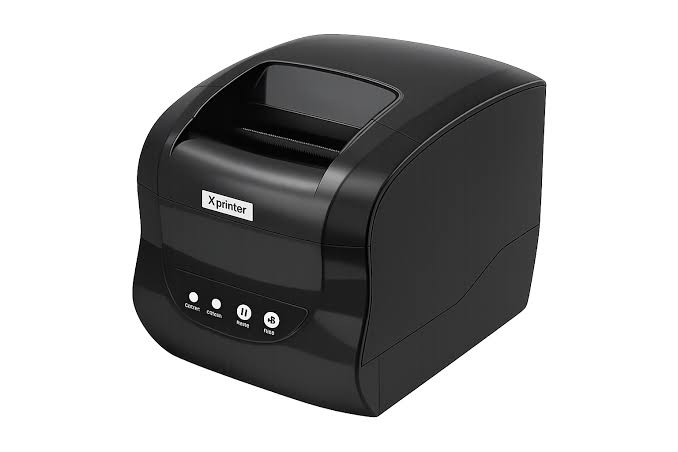
Selecting the right printing equipment is an important decision for businesses that depend on accurate and efficient document production. Retail stores, restaurants, warehouses, logistics companies, and offices all have different printing requirements. While some businesses primarily need transaction receipts, others require product labels, shipping documents, or barcode stickers. Choosing equipment that matches these requirements can improve productivity and simplify everyday operations.
Thermal printers have become a practical option because of their fast printing performance, compact designs, and relatively simple maintenance. When evaluating an Xprinter Thermal Printer, businesses should consider factors such as printing technology, workload, connectivity, media compatibility, and operating costs. Understanding these requirements makes it easier to identify a suitable model without investing in unnecessary features.
1. Identify Your Business Printing Requirements
The first step in choosing a thermal printer is understanding what your business needs to print. Different applications require different printing capabilities, so identifying the intended purpose helps narrow down the available options.
For example, a retail store may need a receipt printer for checkout transactions, while a warehouse may require a label printer for inventory identification.
Common business printing requirements include:
- Sales receipts and payment confirmations
- Product price tags and barcode labels
- Shipping and delivery labels
- Restaurant order tickets
- Inventory identification stickers
- Appointment and service tickets
Creating a list of these requirements helps determine which printer configuration will provide the most practical solution.
2. Understand the Different Types of Thermal Printing Technology
Thermal printers generally use two main printing technologies: direct thermal and thermal transfer. Each method has different characteristics and is suitable for particular applications.
Direct Thermal Printing
Direct thermal printers use heat-sensitive paper that darkens when exposed to a heated printhead. They do not require traditional ink cartridges, toner, or printing ribbons.
This technology is commonly used for:
- Retail receipts
- Restaurant order tickets
- Temporary shipping labels
- Queue tickets
- Short-term product identification
Direct thermal printing is convenient for businesses that need regular printing without managing additional ink or ribbon supplies. However, the printed information may fade when exposed to heat, sunlight, or friction.
Thermal Transfer Printing
Thermal transfer printers use a heated ribbon to transfer ink onto paper or compatible synthetic materials. This process generally produces more durable printed information.
It is suitable for applications such as warehouse labeling, product identification, asset tracking, and industrial packaging.
Businesses should select the printing method according to how long the printed information needs to remain readable and the conditions in which labels will be used.
3. Consider Your Daily Printing Volume
Printing volume has a direct influence on the type of equipment a business should purchase.
A small office that prints a limited number of documents each day may not require the same equipment as a supermarket processing hundreds of transactions.
Before choosing a printer, estimate:
- The average number of receipts or labels printed daily
- Peak printing demand during busy periods
- The number of employees using the equipment
- Expected printing requirements as the business grows
- Whether continuous or occasional printing is necessary
Desktop thermal printers are often suitable for light and moderate workloads, while industrial models are designed for more demanding printing environments.
Selecting a printer according to actual workload can help prevent performance limitations and unnecessary equipment expenses.
4. Evaluate Printing Speed
Printing speed is particularly important in businesses where delays can interrupt customer service or employee productivity.
Thermal printer speed is generally measured in millimeters per second (mm/s). Higher speeds can be beneficial for busy retail counters, restaurants, and shipping departments.
However, printing speed should not be the only deciding factor. Businesses should also consider print resolution, media compatibility, and the complexity of the documents being produced.
A balanced combination of speed and output quality is usually more valuable than choosing the fastest model available.
5. Check Print Resolution and Quality
Print resolution determines how clearly a printer produces text, graphics, and barcodes. It is commonly measured in dots per inch (DPI).
For standard receipts and many basic labels, 203 DPI may provide sufficient clarity. Applications involving smaller text, detailed graphics, or compact barcodes may benefit from higher-resolution options, such as 300 DPI.
When evaluating print quality, consider:
- Readability of small characters
- Barcode scanning accuracy
- Clarity of logos and graphics
- Consistency across multiple print jobs
- Compatibility with the selected paper or label material
The appropriate resolution depends on the type of documents your business produces.
6. Select Suitable Connectivity Options
A thermal printer should connect easily with the devices and software already used in your workplace.
Different models may support USB, Ethernet, Bluetooth, or Wi-Fi connections. Each option offers different installation and operating advantages.
USB
USB connections are suitable for direct communication between printers and computers or POS terminals. They are commonly used in individual checkout stations.
Ethernet
Ethernet supports network-based printing and can be useful in businesses with several workstations or centralized printing requirements.
Bluetooth
Bluetooth allows compatible printers to communicate wirelessly with mobile devices. It can support delivery operations, mobile sales, and field services.
Wi-Fi
Wi-Fi provides wireless network connectivity and offers flexibility when printers need to be installed away from network cables.
Before purchasing, verify that the selected connection type is compatible with your existing devices and business software.
7. Consider Paper Size and Label Compatibility
Not all thermal printers support the same printing materials. Receipt printers and barcode label printers may have different paper widths, roll capacities, and media handling requirements.
Businesses should review the following specifications:
- Supported paper or label width
- Maximum printing width
- Roll diameter and capacity
- Compatible label materials
- Media thickness
- Paper loading mechanism
For example, a restaurant receipt printer may require a different paper configuration from a warehouse label printer.
Choosing compatible materials helps maintain consistent output and reduces the likelihood of paper jams, alignment issues, and unnecessary printhead wear.
8. Determine Whether You Need a Desktop, Mobile, or Industrial Model
Thermal printers are available in different physical configurations designed for specific workplace environments.
Desktop Thermal Printers
<AsyncImage query=”compact desktop thermal receipt and barcode label printer office workstation” aspectRatio=”16:9″ width=”100%”/>
Desktop models are compact and suitable for small businesses, offices, retail counters, and packaging stations. They are a practical choice for regular printing tasks that do not require heavy industrial capacity.
Mobile Thermal Printers
<AsyncImage query=”portable battery powered mobile thermal receipt printer handheld” aspectRatio=”16:9″ width=”100%”/>
Mobile models are designed for employees who need to print while working away from fixed stations. They commonly feature compact construction, rechargeable batteries, and wireless connectivity.
Delivery personnel, field technicians, and mobile retailers may benefit from this configuration.
Industrial Thermal Printers
<AsyncImage query=”heavy duty industrial thermal barcode label printer manufacturing warehouse” aspectRatio=”16:9″ width=”100%”/>
Industrial models are designed for higher printing volumes and demanding working environments. They generally offer larger media capacities and more robust construction.
Manufacturing facilities, distribution centers, and large warehouses may require this type of equipment.
9. Review Software and System Compatibility
A thermal printer must work properly with the software used to manage business operations.
Retailers often rely on POS applications, while warehouses may use inventory management and shipping platforms. The printer should support the operating systems, drivers, and printing commands required by these applications.
Before making a purchase, check:
- Supported operating systems
- Availability of printer drivers
- Compatibility with POS software
- Supported printing languages
- SDK availability for custom integration
- Compatibility with existing hardware
Confirming these details before installation can prevent software-related difficulties and additional configuration costs.
10. Compare Durability and Build Quality
The operating environment can significantly influence the durability requirements of a thermal printer.
A printer used occasionally in a small office may not need the same construction as equipment operating throughout the day in a warehouse or production facility.
Important factors include printhead lifespan, cutter durability, housing materials, and recommended operating conditions.
Businesses should also consider environmental conditions such as dust, temperature, and humidity. Selecting a printer designed for the intended workplace can help reduce unexpected interruptions.
11. Calculate Long-Term Operating Costs
The initial purchase price does not represent the total cost of owning a thermal printer.
Businesses should also consider ongoing expenses associated with paper, labels, ribbons, maintenance, replacement parts, and electricity.
Direct thermal printers eliminate ink and toner requirements, which can reduce certain consumable expenses. Thermal transfer models require ribbons but may provide more durable labels for demanding applications.
A useful comparison should include:
| Cost Factor | What to Consider |
|---|---|
| Initial price | Equipment purchase cost |
| Printing materials | Paper, labels, and ribbons |
| Maintenance | Cleaning and servicing requirements |
| Replacement parts | Printheads, cutters, and rollers |
| Energy consumption | Electricity used during operation |
| Technical support | Warranty and service availability |
Comparing these expenses over the expected service life of the printer provides a clearer picture of its overall value.
12. Evaluate Maintenance and Technical Support
Regular maintenance is necessary to maintain consistent printing performance. However, the ease of maintaining a device can vary between models.
Look for printers with accessible components, straightforward paper-loading procedures, and clear maintenance instructions.
It is also useful to review warranty terms, technical documentation, replacement part availability, and customer support arrangements.
Reliable support can be particularly important for businesses that depend on uninterrupted printing throughout their operating hours.
Choosing the Right Thermal Printer for Different Industries
Different industries prioritize different printer features. The following examples can help businesses understand which specifications deserve attention.
| Industry | Recommended Printer Type | Important Considerations |
|---|---|---|
| Retail | POS receipt or desktop label printer | Speed, cutter, connectivity |
| Restaurants | POS thermal printer | Fast order printing, software integration |
| Warehousing | Desktop or industrial label printer | Barcode quality, media capacity |
| Logistics | Thermal shipping label printer | Label dimensions, connectivity |
| Healthcare | Compatible receipt or label printer | Print clarity, suitable media |
| Field services | Mobile thermal printer | Battery life, portability, wireless connection |
| Manufacturing | Industrial thermal printer | Durability, workload, label compatibility |
These are general recommendations. The final selection should depend on individual business processes and specific product specifications.
Common Mistakes to Avoid When Purchasing a Thermal Printer
Choosing equipment without evaluating its actual requirements can create unnecessary costs and operational difficulties.
Some common mistakes include:
Focusing only on the purchase price: A low-cost model may not provide the durability or features required for regular commercial use.
Ignoring printing technology: Direct thermal and thermal transfer printers serve different purposes, particularly regarding label durability.
Overlooking connectivity: An incompatible interface can make installation and software integration difficult.
Underestimating printing volume: A printer designed for occasional use may struggle with demanding daily workloads.
Neglecting media compatibility: Incorrect paper or label specifications can affect feeding and print quality.
Failing to check technical support: Limited documentation or unavailable replacement parts may complicate future maintenance.
Avoiding these mistakes helps businesses make more informed purchasing decisions.
Conclusion
Choosing the right thermal printer requires a clear understanding of business printing requirements, daily workload, printing technology, connectivity, media compatibility, and long-term operating expenses. Different industries need different configurations, so there is no single printer type that suits every business.
By comparing these factors carefully, businesses can identify equipment that supports their existing workflows and future operational needs. A suitable thermal printer can improve transaction processing, simplify labeling activities, support accurate inventory management, and reduce unnecessary manual work. Investing time in evaluating specifications before purchasing ultimately helps organizations achieve more reliable and efficient printing operations.